

Overview
In today’s enterprise integration landscape, managing access to projects is not just an administrative task it’s a strategic necessity.
Organizations working with Oracle Integration often have multiple teams such as HCM, ERP, and Finance operating within the same environment. Without a structured access model, this can lead to security risks, operational conflicts, and compliance challenges.
This is where Role-Based Access Control (RBAC) becomes critical.
RBAC enables organizations to define who can view, edit, and monitor projects, ensuring that access is both controlled and aligned with business responsibilities.
The Challenge: Managing Access in Shared Environments
When multiple teams share a single Oracle Integration instance, common challenges include:

- Lack of visibility control across teams
- Unauthorized access to sensitive integrations
- Difficulty in enforcing governance policies
- Increased risk of accidental changes
For example, an HCM team should not have access to ERP integrations and vice versa. Without RBAC, enforcing this separation becomes difficult.
The Solution: Role-Based Access Control (RBAC)
RBAC introduces a layered access control mechanism that works alongside Oracle service roles.

It allows organizations to:
- Restrict access to specific projects
- Assign permissions based on job roles
- Ensure users only interact with relevant resources
This creates a secure and well-governed integration environment.
Key Capabilities of RBAC
1. Project Isolation
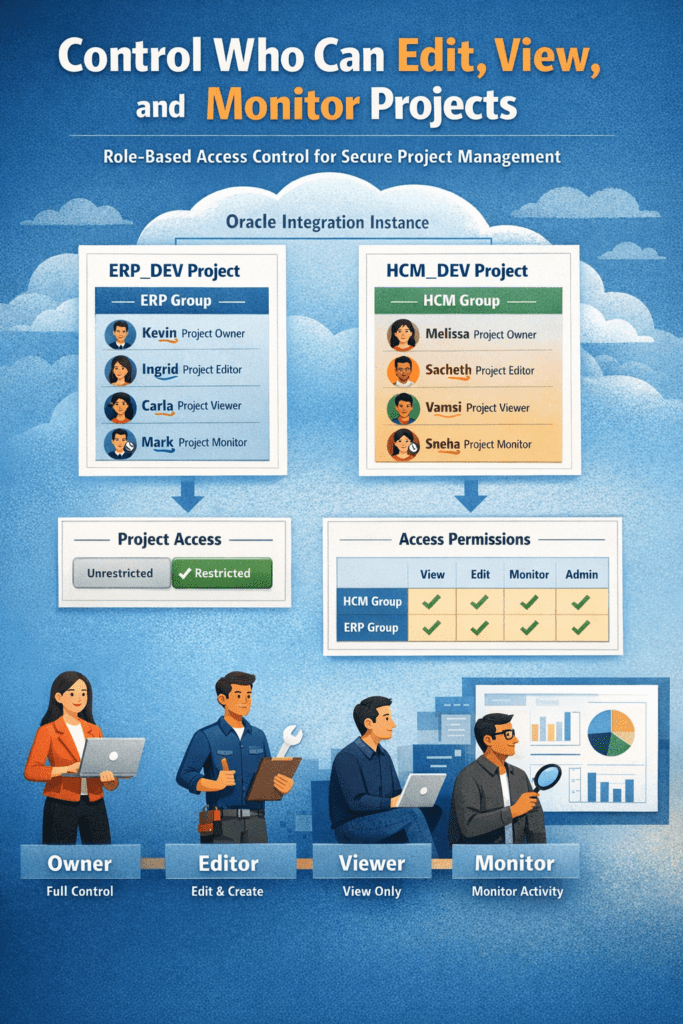
RBAC enables project-level isolation, allowing multiple teams to work independently within the same instance.
- HCM team → Access only HCM projects
- ERP team → Access only ERP projects
This ensures:
- Better security
- Reduced interference
- Clear ownership of integrations
2. Granular Permission Levels
RBAC provides multiple permission levels tailored to business needs:
- Owner – Full control over the project, including access management
- Editor – Can create, modify, and execute integrations
- Viewer – Read-only access to project details
- Monitor – Can track runtime activities and performance
- None – No access beyond project visibility
This structured model ensures users have exactly the level of access they need no more, no less.
3. Integration with Service Roles
RBAC works in combination with Oracle service roles such as:
- ServiceDeveloper
- ServiceMonitor
- ServiceInvoker
A key principle:
Service roles always take precedence over project permissions
This prevents privilege escalation and ensures enterprise-grade security compliance.
How RBAC Works in Practice
A typical implementation looks like this:
- Project Owner assigns access permissions
- Editors build and manage integrations
- Viewers review configurations
- Monitors track runtime and performance

Each role operates within clearly defined boundaries, ensuring:
- Accountability
- Efficiency
- Reduced operational conflicts
Governance and Best Practices
To maximize the value of RBAC, organizations should follow these best practices:
✔ Grant only the minimum required access
✔ Avoid exposing sensitive information in project names
✔ Assign editing rights carefully
✔ Separate permissions across environments (Dev, Test, Prod)
These practices help build a secure, compliant, and scalable integration framework.
Business Benefits
Implementing RBAC delivers tangible business value:
Enhanced Security
Protect sensitive integrations and data from unauthorized access
Operational Efficiency
Reduce confusion and streamline collaboration across teams
Scalability
Easily manage growing teams and projects
Compliance
Support audit and regulatory requirements with structured access
Why This Matters for Your Organization
RBAC is more than just a technical feature it is a foundation for controlled and scalable enterprise integration.
Organizations that implement RBAC effectively can:
- Minimize risks
- Improve collaboration
- Accelerate digital transformation initiatives
How We Add Value
Implementing RBAC correctly requires both technical expertise and business understanding.
We help organizations:
- Design secure Oracle Integration architectures
- Implement RBAC aligned with business roles
- Optimize governance and compliance
- Ensure scalable and future-ready integration environments
Let’s Talk
If your organization is looking to:
- Strengthen access control
- Improve integration governance
- Scale securely on Oracle Integration
We’d be happy to help.
